

Microsoft recently introduced the ability to upload files as part of MS Forms, or at least it only just started appearing in UK tenants. This is functionality I had been waiting for as it makes MS Forms so much more flexible and useful especially for situations where you might want users to upload a document or image as part of a form return. I therefore thought it might be useful to blog a little about this new functionality in use.
Adding a form upload to a form is almost as easy as adding any other question type. Simply click the Add new option then use the arrow to the right of the question types to then allow you to select the File Upload question type.

You can now enter the question which will be associated with the file upload. This might be as simple as “Upload your file(s) here” or might state the type of files you want people to upload such as “Upload your images”, etc. Each file upload question also comes complete with the ability to adjust the number of files that can be uploaded up to a maximum of 10 or you can also add more than one file upload question to a single form. This provides flexibility in how you want users to upload their files, either uploading all relevant files in a single upload question or uploading each required file to a different question.
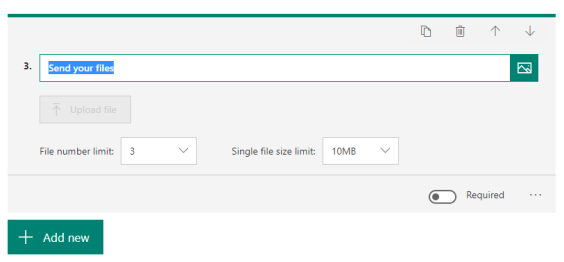
You can also set the limitations in terms of file size with options for 10Mb, 100Mb and 1Gb. My advice here would be to limit to smaller file sizes just to avoid potential upload issues where users have limited bandwidth however I haven’t personally tested uploading 1Gb files so it may work perfectly well.
Once you have setup the above and shared your form the next bit is being able to review submitted files. For my example I setup a form from my own user account meaning that Forms automatically created a folder in my OneDrive to store the files. I assume if a form was setup in Teams it would equally create a file store in teams and store the uploaded files there. The files are basically stored in the Microsoft Forms subfolder within the Apps folder which will appear in your OneDrive. Inside this folder a new folder titled to match the forms title will appear. This allows you to easily identify which files relate to which of your forms.
Files uploaded retain their original file name based on the file being uploaded by users however this has the name of the user appended to it. This highlights one limitation of MS Forms in that you need to be a user within the Office 365 tenant to upload files, so you can’t create a publicly accessible form which allows unauthenticated users to upload files. Although a limitation, I see this as only a minor issue as I can see potentially significant risk if unauthenticated uploads were supported.
If a user uploads the same file more than once Forms simply enumerates the filename appending 1, 2, 3, etc to it to identify each separate upload of the file.
One feature I particularly like is when you export the responses from your Form to excel. For each file upload the URL link is provided in the resultant spreadsheet with this link taking you to the relevant file in OneDrive with multiple file uploads listed in a cell but separated by a semi-colon. This will mean that for multiple file upload questions you may need to do a little processing on individual cells if you want to separate each link into a different cell however this is relatively simple to do.
Overall, I love this additional functionality in Microsoft Teams and look forward to making increasing use of it going forward.
 Another year another BETT and guess what? Once again, I failed to learn from experience and decided to make my way down via train and once again it went wrong. This time it was simply my first train being late leading to me missing my connecting train. This had the same concertina impact as I experienced last year leading to me rushing around. Maybe next year I will learn? Third time lucky?
 In terms of the other speakers, who presented in a more professional and polished manner than myself, I found Emma Darcy and her discussion with Ty very interesting discussing. I particularly liked her mention of preparing students for “jobs of the future” which fits with my views in the needs to do more in relation to digital citizenship.
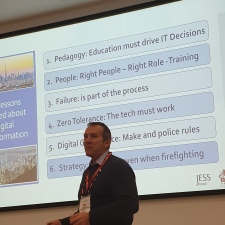 Also, another highlight was Mark Steed. Now I have heard mark speak on a number of occasions, but his 6 lessons were particularly interesting. Like Laura Knight he mentioned the need to focus on people, adding to this regarding a focus on training. He also highlighted that although his strategy appears to have been very successful it wasn’t without errors. I think this is an important message in that in reviewing others strategies and approaches it almost always looks like a straight line; they were here then did X and Y and got to there. The reality thought is that there would likely have been lots of wrong turns, mistakes, problems so its more like they did A, B, C, D, E and A and B didn’t work, C had to be adjusted and became F, and eventually they got to X and Y and success. I think this is what I was trying to get across with my journey idiom however I don’t think I was successful in this.
 As to BETT, after all my rushing around I only ended up with a couple of hours in BETT so can only offer a rather superficial view. Sadly, this view is that the event generally seemed very much the same as it has in every year I have attended since returning to the UK. If you had a specific stand or vendor to see, then it would be useful but if you are seeking to browse or to find innovative ideas then I think you would have been disappointed. This at least was my initial view on reflecting having returned home. A few days have passed this then I have reflected a bit more and I can see how BETT can be seen as very worthwhile now. It isn’t in the EdTech conference which the event is, or in the stands of technology vendors. The strength in BETT lies in the fact the event draws educators and EdTech leaders from across the country and across the world together for 4 days and in the networking this brings. On hindsight, even in my brief visit, I ended up at one stand where I had conversations with a number of EdTech leaders and as a result came away with plans to connect further and explore ideas and also issues and problems. But from this comes a question: Can we stimulate the same networking opportunities without the massive cost to vendors to be present at an event like BETT? A cost they ultimately pass on to their customers; schools.
 Its BETT this week! Will be popping down to have a brief look on Thursday and also to speak at the EdTech UK Conversations event also on Thursday. Given the shortness of my visit to BETT I am unlikely to be able to make the most of the various talks and presentations which will be going on. Sadly, there is little I am able to do about this although I will be planning for a more significant visit to BETT next year assuming my brief visit turns out to be worthwhile.
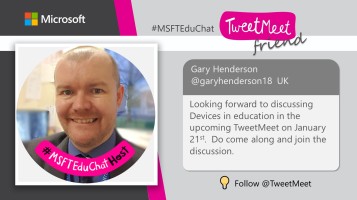 I am currently looking forward to being one of a number of hosts for a Microsoft TweetMeet due to happen on 21st January focusing on the topic: “Devices for Student Success”. The event promises to see educators from all over the world sharing thoughts and ideas in relation to educational technology and in particular how to bring about success through using iPads, laptops, MS Surfaces, Chromebook, mobile phones or other mobile devices.


 It’s that time again to make some pledges for the year ahead. I think it is important to document this to give the older me, in a years’ time, something to look back on. I have long accepted that memory is far from accurate and therefore there is a need to keep a record.
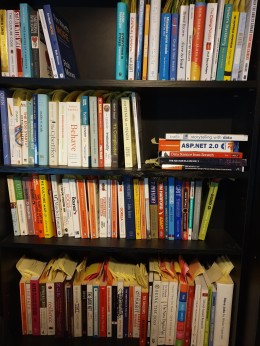 Again, I achieved my target of reading 12 books and a number of them I very much enjoyed and think they added to both my knowledge and understanding. My library of books is starting to look quite impressive in my eyes at least. The one issue I have had however is that my reading has not been constant enough throughout the year, instead being made up of a number of smaller sprints through books. This is something I want to consider next year.
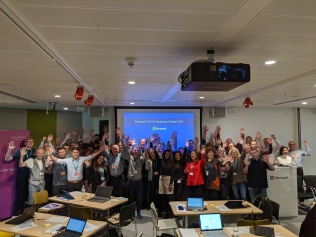 I think I have developed as a professional this year on several fronts albeit I haven’t done many Udemy or other courses and haven’t picked up many certificates. What I have done however is read and explore topics, ask questions and challenge ideas and try to get more involved in communities discussing areas which I find of interest. I have also attended and event presented at some excellent events.
 Technology and Learning